

A Python console inside Home Assistant
2 min read

Debugging Home Assistant often means adding a log line, restarting, and trying again. Or attaching a debugger to look around. Starting with Home Assistant 2026.11, there is a quicker way to look inside a running instance: the debug console.
It is a Python console in the Tools panel, much like the console in the developer tools of your web browser. You run code inside Home Assistant itself, with hass available, and look at what comes back.
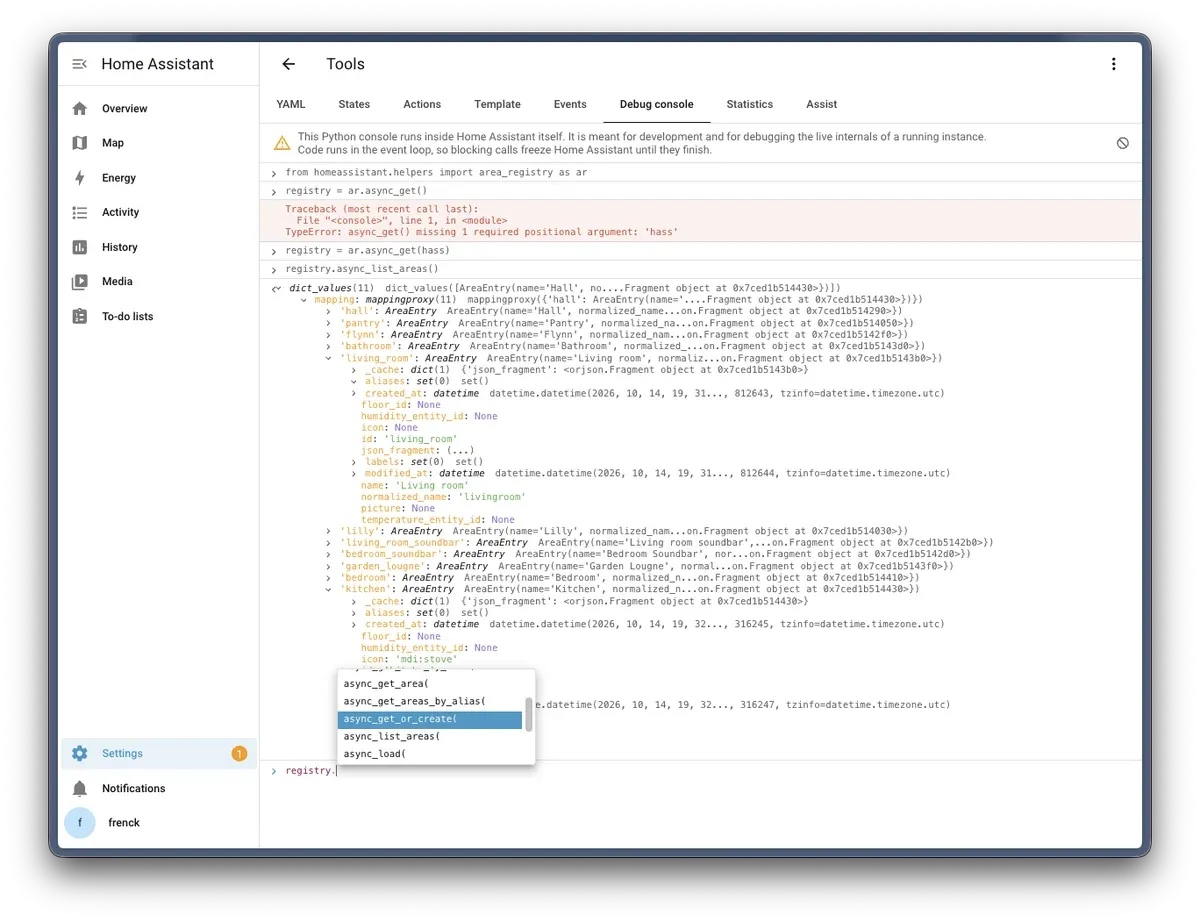
The debug console is off until you enable it in YAML, on every version:
debug_console:Restart Home Assistant, and administrators find it under Settings > Tools > Debug console. In the development container, script/setup adds this line for you.
It is YAML only on purpose. Code in the browser of an administrator, like a custom card, can do anything the user interface can do. If the console could be enabled from the user interface, such code could enable it too, and run Python unnoticed.
hass.states.get("sun.sun")awaitworks at the top level, so you can call asynchronous code directly.- Results are objects you can expand, like in a browser console. Properties only run when you select them, as reading them can have side effects.
print()works likeconsole.log: objects you print can be expanded too.- It completes names, attributes, imports, and keyword arguments while you type, and shows the signature of the function you are calling. None of that runs your code: completion reads everything statically.
- Code that waits does not hold up the console. Run
await event.wait(), and you can still runevent.set()next. Stop cancels code that is still running. - Variables are kept per browser tab, also when you reload the page.
Running code inside Home Assistant is powerful, and that cuts both ways. "Paste this into the console" is a common way to trick people, so:
- Each administrator accepts a warning before using the console.
- Pasting is blocked until you type
allow pasting, like in a browser console. - Everything that runs is written to the Home Assistant log, with who ran it.
Code runs in the event loop of Home Assistant. A blocking call, like time.sleep(), freezes Home Assistant until it finishes, and Stop cannot interrupt it. Use await, or run blocking work with await hass.async_add_executor_job(...).
The console is for development and debugging, not for building on. Nothing you set up there survives a restart.
Read more in the Debug console documentation, and on the development environment page.

